> ## Documentation Index
> Fetch the complete documentation index at: https://docs.onspace.ai/llms.txt
> Use this file to discover all available pages before exploring further.
# Supabase Integration
> Supercharge your OnSpace builds with Supabase's all-in-one backend platform, creating dynamic full-stack applications with enterprise-grade capabilities.
OnSpace's seamless Supabase integration enables you to control every aspect of your application—from user interface design to database architecture—all through one intelligent conversational platform. This means you can simultaneously create engaging app interfaces and configure powerful PostgreSQL cloud databases without ever switching tools or platforms.
This consolidated workflow revolutionizes how applications are built: beginners can leverage OnSpace's smart recommendations and intuitive guidance to create professional-grade apps, while expert developers can instantly access Supabase's full suite of advanced features whenever complex functionality is required.
## Overview
OnSpace seamlessly integrates with Supabase, the leading open-source Firebase alternative that delivers enterprise-grade PostgreSQL databases with real-time capabilities, user authentication, file storage, and serverless functions. This integration transforms your OnSpace app with instant access to a production-ready backend infrastructure—no boilerplate code or server configuration required.
**PostgreSQL Database Foundation**\
Deploy robust SQL-powered data storage with OnSpace's intelligent schema generation. Simply describe your data needs, and OnSpace automatically creates the necessary tables and relationships.
**Secure User Management**\
Implement comprehensive authentication systems including email/password flows, social logins (Google, GitHub, etc.), and access control—all configured through natural language prompts.
**Cloud File Management**\
Handle image uploads, document storage, and media files through Supabase's integrated storage solution, perfect for user avatars, content assets, and file sharing features.
**Live Data Synchronization**\
Enable real-time features like instant messaging, collaborative editing, live notifications, and dynamic dashboards that update across all connected users simultaneously.
**Serverless Backend Functions**\
Deploy custom business logic using Supabase Edge Functions for email automation, payment processing, AI integrations, and third-party API connections.
### Why Choose OnSpace's Supabase Integration?
OnSpace eliminates the traditional complexity of coordinating frontend and backend development. Through conversational AI, you can simultaneously design your user interface and configure the underlying database architecture.
Example in action: Request "Create a customer review system that stores ratings and comments" and OnSpace will generate both the review form interface and the database table structure, connecting them automatically. This unified approach accelerates development while maintaining professional-grade architecture.
## **Setup Guide: Connecting Your OnSpace Project**
### **Prerequisites**
* Active Supabase account (free tier available)
* OnSpace project ready for integration
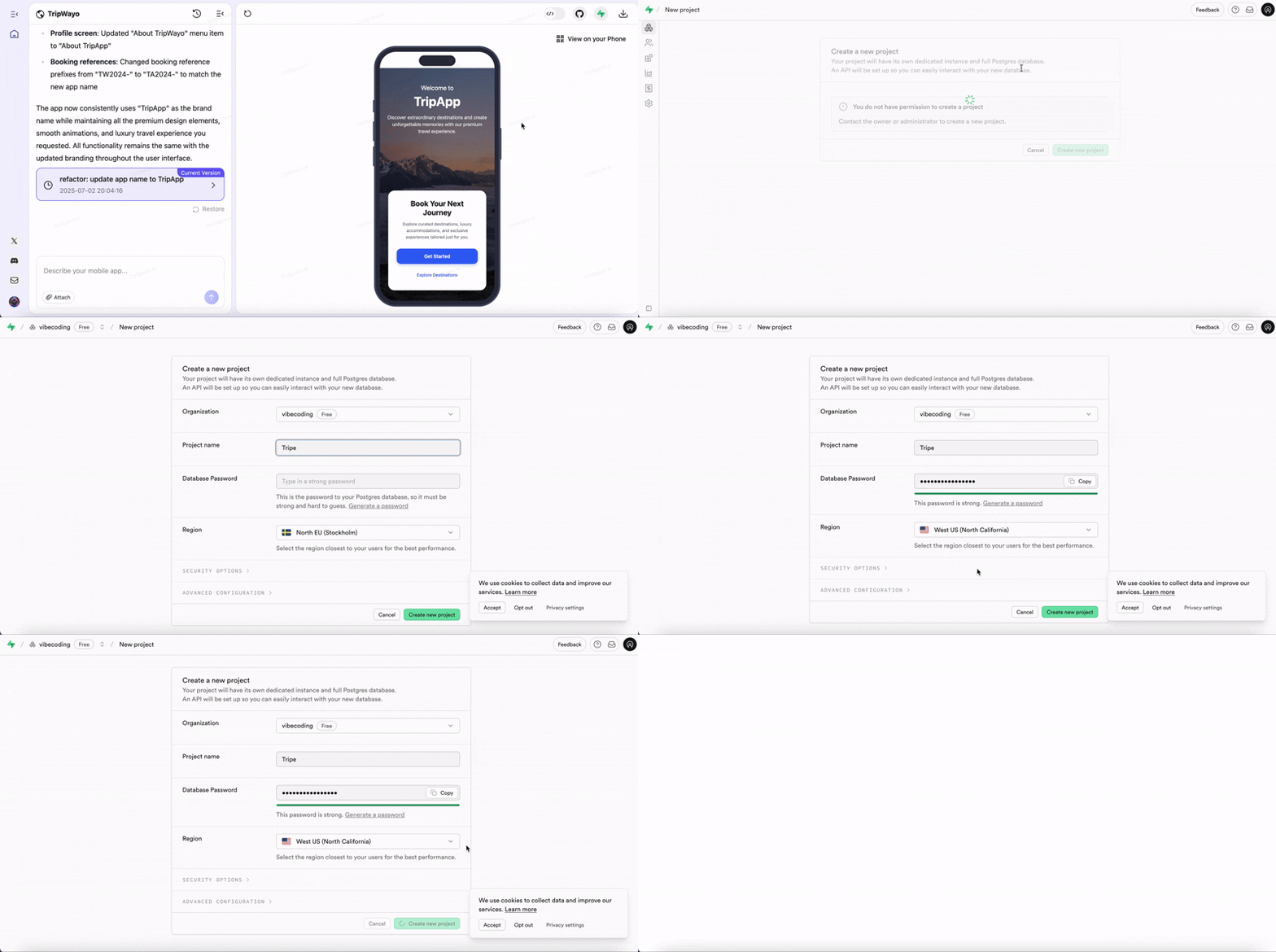
### **Step 1: Supabase Account Setup**
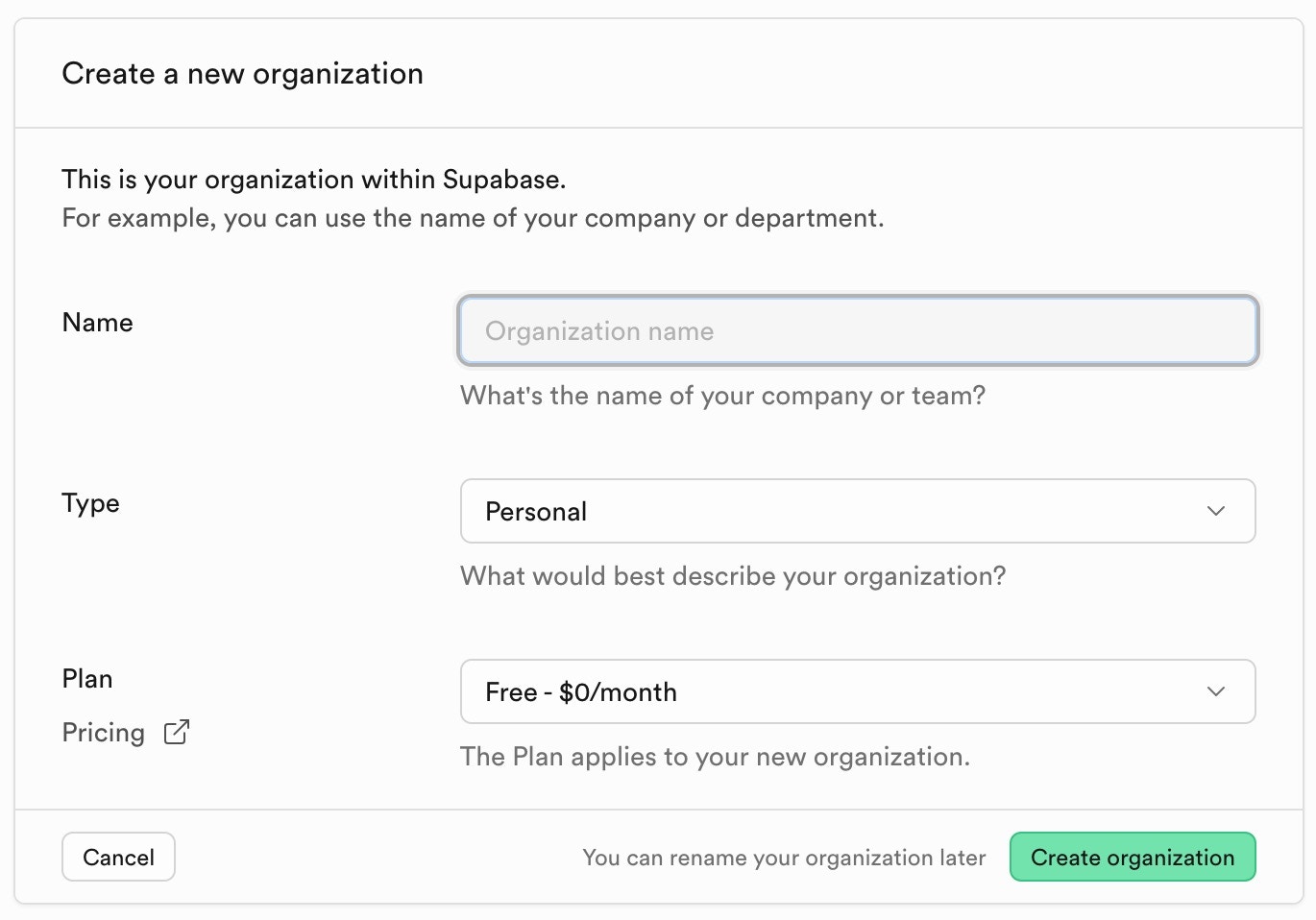
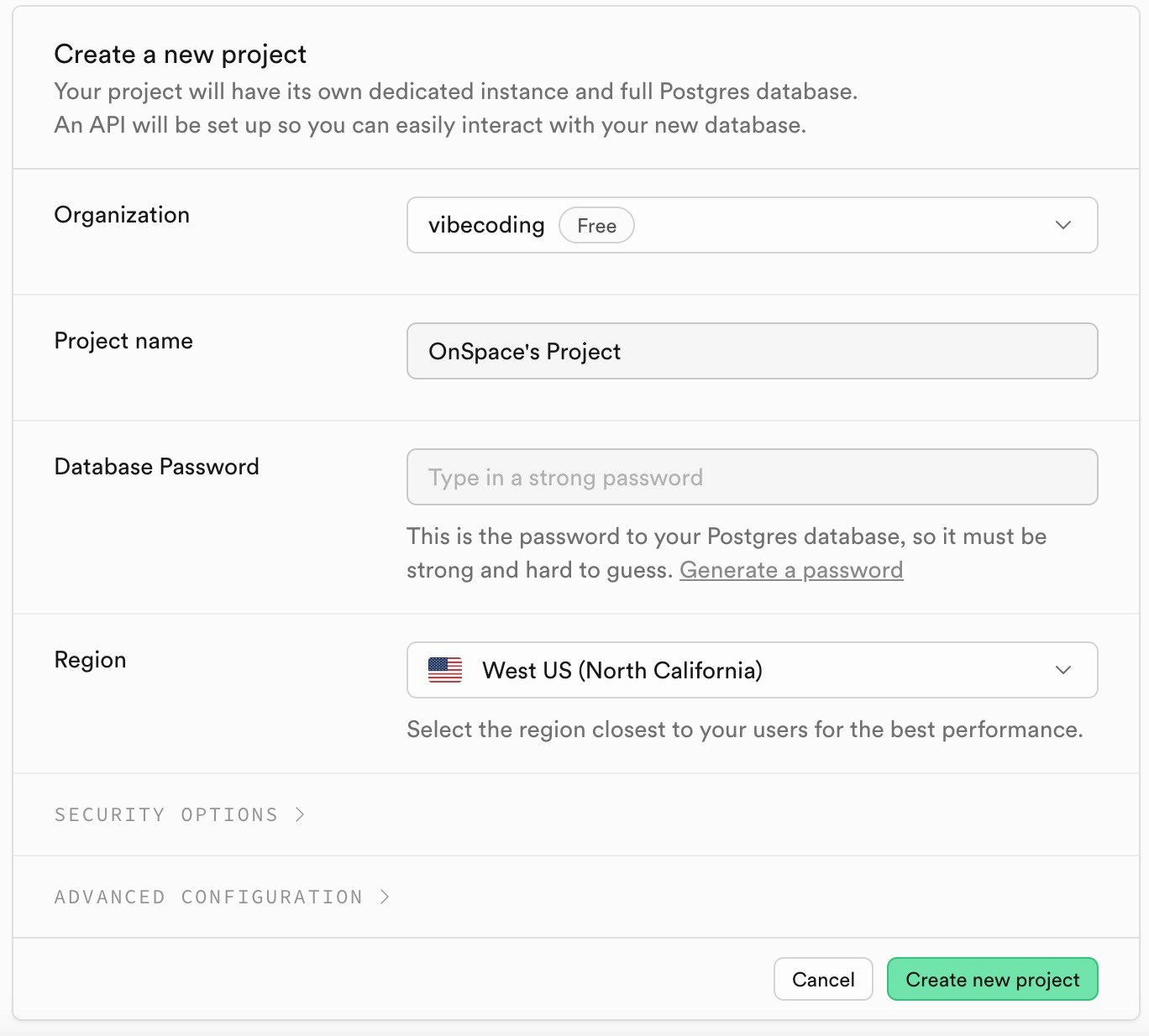
Navigate to Supabase and either create a new account or sign into your existing one.
1. **Create a new organization**
2. **Create a new project**
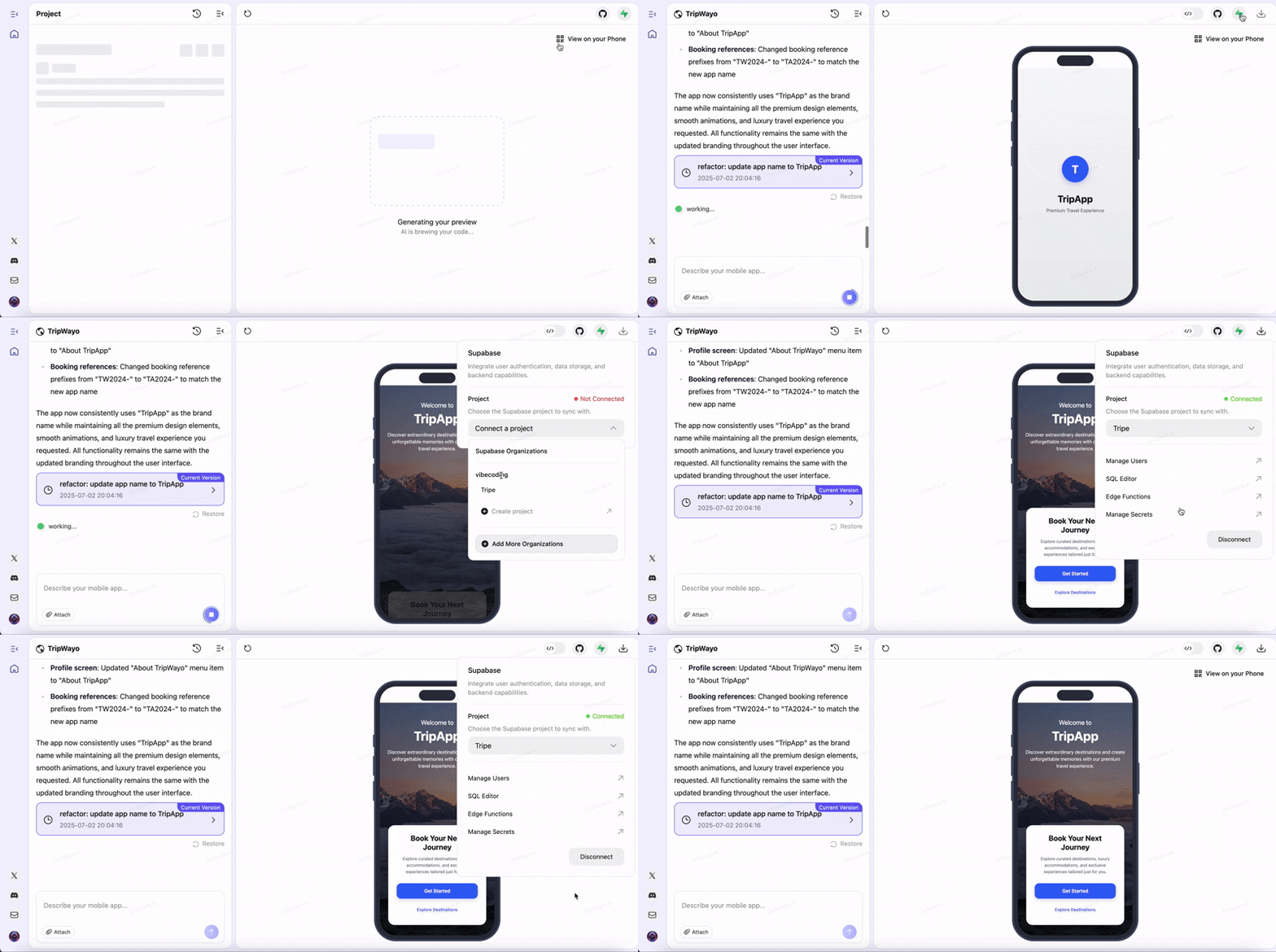
### Step 2: OnSpace Integration
**Initialize Connection**\
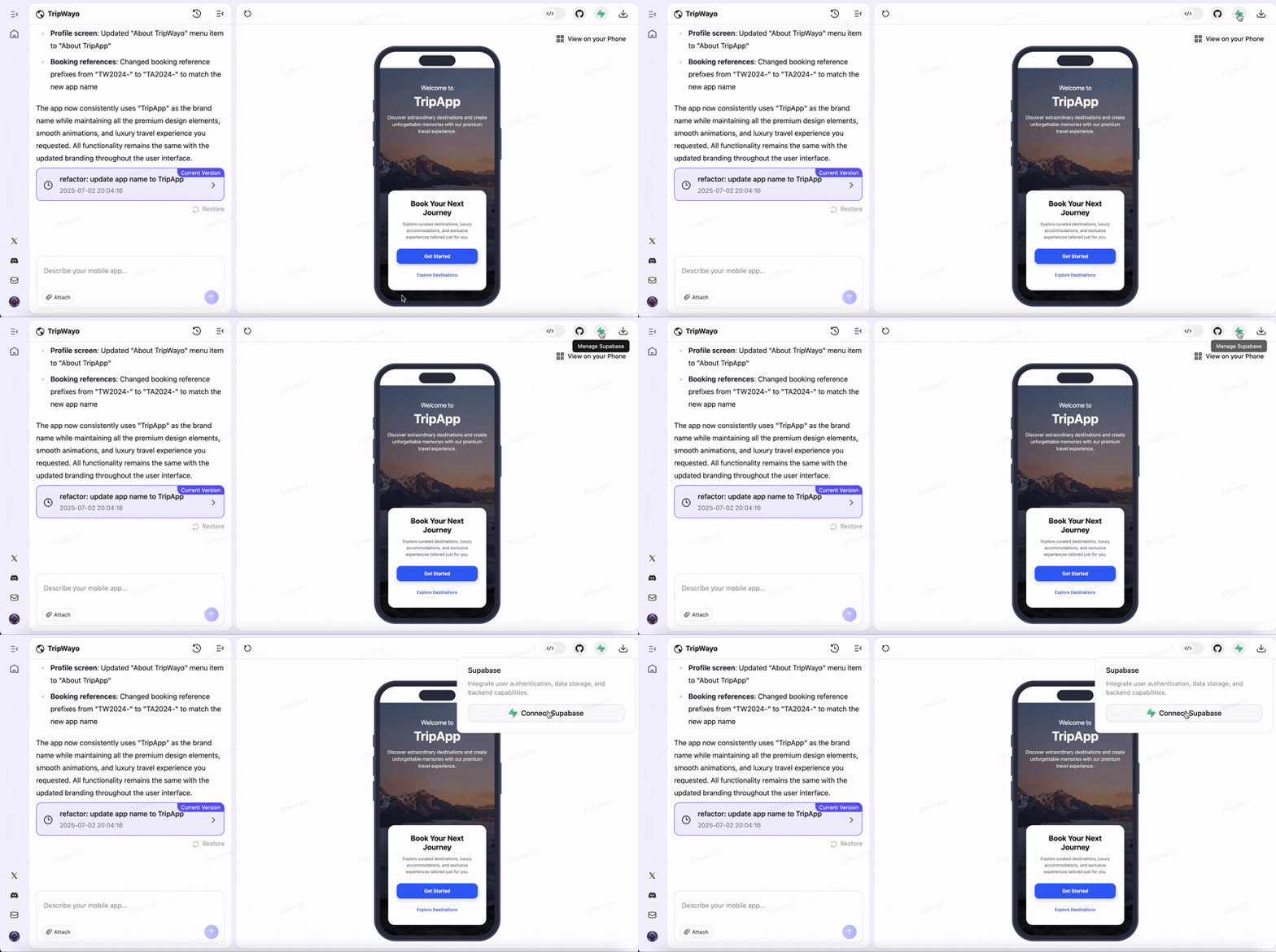
From the top right corner of your current project, click the Supabase icon and choose **Connect Supabase**.
**Account Authorization**\
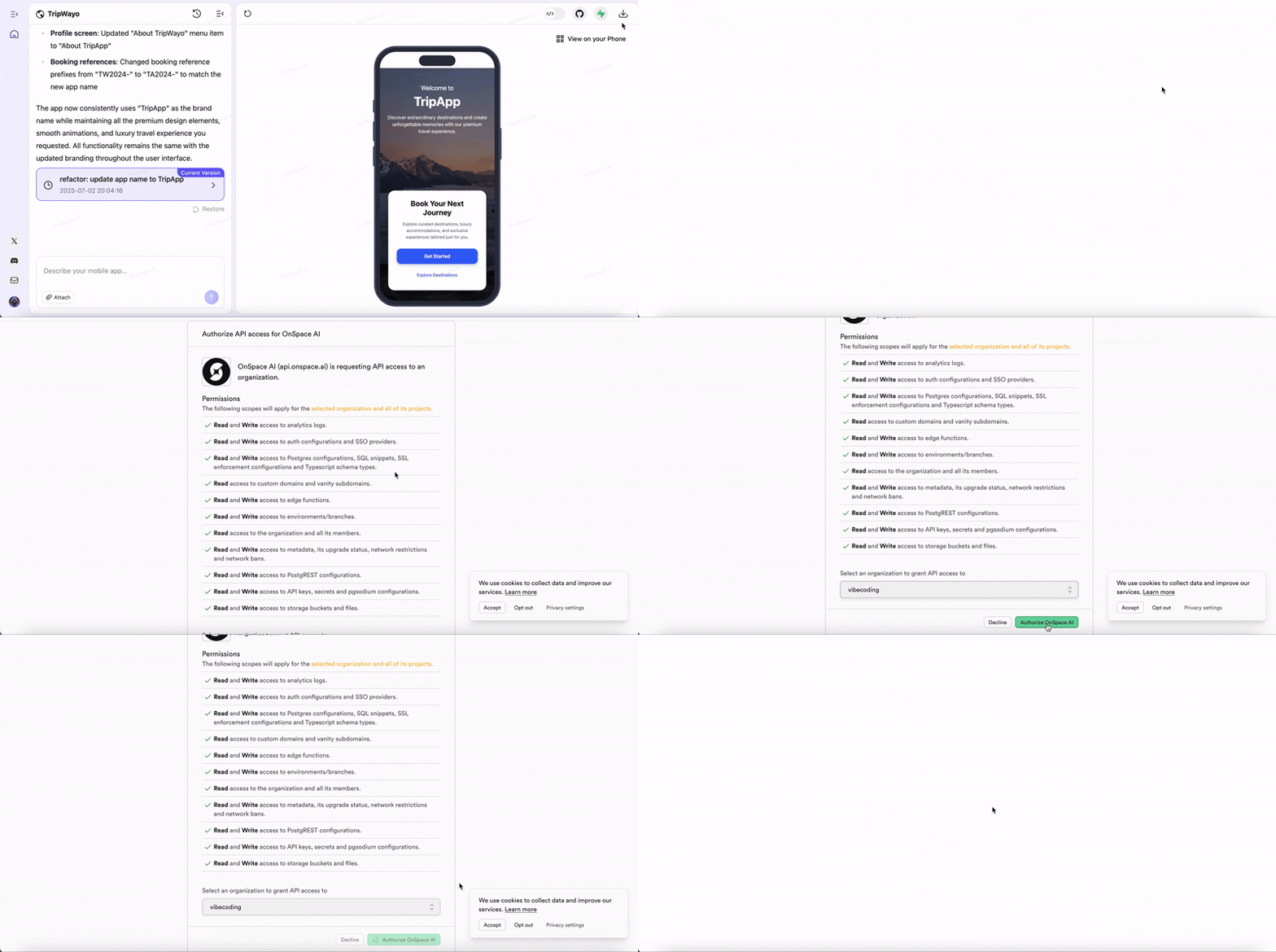
Complete the Supabase login process and authorize OnSpace's access to your account.
**Project Selection**\
Choose your target Supabase organization and project, or create a new project.
**Configuration Completion**
To connect Supabase in OnSpace: Open your project, click **"Refresh Browser"** → **Supabase icon** → select your project from the **dropdown**. When you see the green **"Connect"** message, the setup is complete.
Your OnSpace app now has full access to Supabase's database, authentication, and backend services.
## How to Create Functional Login and Signup
Ready to implement authentication in your OnSpace application? This step-by-step video tutorial demonstrates how to build a complete user authentication system using OnSpace's intuitive interface combined with Supabase's powerful backend capabilities.
 2. **Create a new project**
 ### Step 2: OnSpace Integration
**Initialize Connection**\
From the top right corner of your current project, click the Supabase icon and choose **Connect Supabase**.
### Step 2: OnSpace Integration
**Initialize Connection**\
From the top right corner of your current project, click the Supabase icon and choose **Connect Supabase**.
 **Account Authorization**\
Complete the Supabase login process and authorize OnSpace's access to your account.
**Account Authorization**\
Complete the Supabase login process and authorize OnSpace's access to your account.
 **Project Selection**\
Choose your target Supabase organization and project, or create a new project.
**Project Selection**\
Choose your target Supabase organization and project, or create a new project.
 **Configuration Completion**
To connect Supabase in OnSpace: Open your project, click **"Refresh Browser"** → **Supabase icon** → select your project from the **dropdown**. When you see the green **"Connect"** message, the setup is complete.
**Configuration Completion**
To connect Supabase in OnSpace: Open your project, click **"Refresh Browser"** → **Supabase icon** → select your project from the **dropdown**. When you see the green **"Connect"** message, the setup is complete.
 Your OnSpace app now has full access to Supabase's database, authentication, and backend services.
## How to Create Functional Login and Signup
Ready to implement authentication in your OnSpace application? This step-by-step video tutorial demonstrates how to build a complete user authentication system using OnSpace's intuitive interface combined with Supabase's powerful backend capabilities.
Your OnSpace app now has full access to Supabase's database, authentication, and backend services.
## How to Create Functional Login and Signup
Ready to implement authentication in your OnSpace application? This step-by-step video tutorial demonstrates how to build a complete user authentication system using OnSpace's intuitive interface combined with Supabase's powerful backend capabilities.